Tag name:cyberpunk

Cyberpunk Session 2

First published 28th August 2023 (Last Modified 8th April 2025)

(Played on 27th August 2023)

Tremen's log

Crime Scene Tape and a camera

Something we did in the background of our crime scene investiagation

Team Members: Spooky Witch (tech), Tharbinsan (medtech), Wakiya Kiku (Sniper/Paranoid), Ricky (Lawman), Tremen (Lawman)

As our investigations continued I was distracted by a faint buzzing sound comming from next to where I was standing - this turned out to be a burnt out listening bug planted between the (very) large screen TV and the light bar above it. The bug had burned out before we arrived in the apartment and had probably burnt out shortly after it had been placed.

Closer examination of the body by both Spooky and Ricky showed (after some initial contamination of the scene by Ricky) that the body had been shot from some range, most likely from about the bathroom door. Ricky also confirmed that the body was that of Hayato Kita. Kita was employed by Sato Imports, a import/export business dealing in alcoholic drinks1. Kita was wearing ordinary street clothes with no sign of any robbery (other than that of his brain) as his rings and other items were still present.

Current theory is that the Victim let the perpetrator into the apartment who then shot Kita as he returned to the lounge. The perpetrator then removed Kita's brain without finesse and left.

Tharbinson reported that in addition to the cash2 and cards, there was a little black book of contacts and dates. While almost all the dates are in the past there is an entry for tomorrow: Maria, 12:30 tomorrow, Shinchuko station, pink carnation

Spooky examined the brain case found earlier by Wakiya in the bedroom3. This was battery powered whose battery was capable of running the brain case for seven days (and had about four days of juice remaining). She reports that this brain case was made in america (as opposed to the cybertech of the victim which was manufactured in Japan).

Examining the lobby CCTV and the apartment building's records shows that Kita had lived there for about six years. He returned to the apartment at around noon and was murdered at about 1pm. Her returned wearing a business suit. Close exmination of the CCTV showed that the front door closed a fraction of a second later that it does normally after an inhabitant of an apartment on the fourth floor returned from getting some supplies from the local store4. With the help of Wakiya cameras watching the street were identified and their footage checked - these do not show anybody unexpected arriving (and in particular then disappearing behind any form of stealth technology). This suggests that the individual who presumably entered the apartment block was both stealthed and competant.

After some discussion a through search of the apartment for more survelliance devices leads to a well hidden and still operating bug. Spooky tracks the signal it is sending to the Jonanjima Port District which, as it happens, Sato Imports has a building. She believes her tracking was not detected.

Tremen's current theory5

Hayato Kita was involved in Sato Imports illicit business but had betrayed Sato Import (either by defecting to another gang or selling some of the illicit goods on the side). He had betrayed Sato Imports because he was being blackmailed by someone relatively imcompetant who got their blackmail from the first, now burnt out, bug. However Sato Imports are much more competant and had placed the second functional bug, possibly when they recruited Kita, They discovered Kita's betrayal and took him out in a way that demostrated to others working for Sato Imports that you don't betray them. They took the brain to find Kita's other contacts. However by making a noisy demonstration they did not leave themselves enough time for a search of the apartment.

Items taken by us from the crime scene
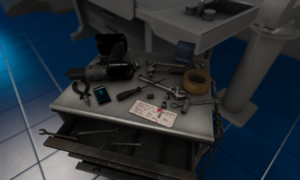
A set of investigative tools on a workbench

Getting ready to investigate our finds back at the lab

  • Fake ids
  • Money found at the scene
  • Bugs (both the broken one and the second one6
  • Brain case found in the bedroom
  • Black Book found in the bathroom
  • Blood samples
  • Brain Dances
  • Copy of the lobby security footage
  • The body
  • Photographs of the apartment

Follow up actions

  • Meet and/or follow and/or surveil Maria at the train station
  • Keep ear to the ground/street for any rumours swirling about Kita and/or Sato Imports

Footnotes

  1. after bypassing some additional security on the departmental files, rumoured to be dealing with adultertated drinks laced with narcotics amongst other things - however, even with a raid on their premises, there's no solid evidence of this.
  2. Which are currency notes in general circulation
  3. i.e., not on the body, which had its own brain case from which Kita's brain had been ripped
  4. This individual was interviewed later and didn't report anything unusual.
  5. Note: there are holes in this theory, just like any other theory, but it's the best theory I have at the moment
  6. Disabled by Section 9's security as we return.

Cyberpunk Session 1

First published 31st July 2023 (Last Modified 8th April 2025)

(Played on 30th July 2023)

Tremen's log

Hooded Man standing with his back to us in a graffitied and neon lit alley way

Could this be our victim?

Team Members: Spooky Witch (tech), Tharbinsan (medtech), Wakiya Kiku (Sniper/Paranoid), Ricky (Lawman), Tremen (Lawman)

My team called to assist in the investigation of a murder at apartment block. Traffic to get to the scene of the crime terrible (so terrible that Spooky Witch (who lives nearby) was able to easily beat the rest of the team to the scene. Local attending police numbers six (and three squad cars and Crime Scene Investigation Van).

Inhabitants called in the Police after an altercation on the tenth floor. When the Police attended there was no reply from the relevant apartment but there was a blood and cyberfluid trail (of droplets) leading to (or from) the apartment to the lifts. Given the lack of response a drone was deployed through the mail slot to scan the inside of the apartment. My team called when the drone spotted the body of a male with both a gun shot wound and a head split open to reveal an empty brain case

Entered the apartment building and checked out the entryway and the lifts to assess risks and whether the perpetrator was still present at that level. No sign of either the perpetrator or of any additional blood/cyberfluid.

Proceeded up the stairs to the tenth floor, checking as we went for more signs (none found)

Entered the victim's apartment and conducted a search. Victim was Hayato Kita. Outward signs of just being a low level corporate drone but Tharbinsan discovered (hidden in the bathroom) a considerable quantity of cash and credit cards which suggests that the victim's could be something much more important. Investigations continued in the next session.

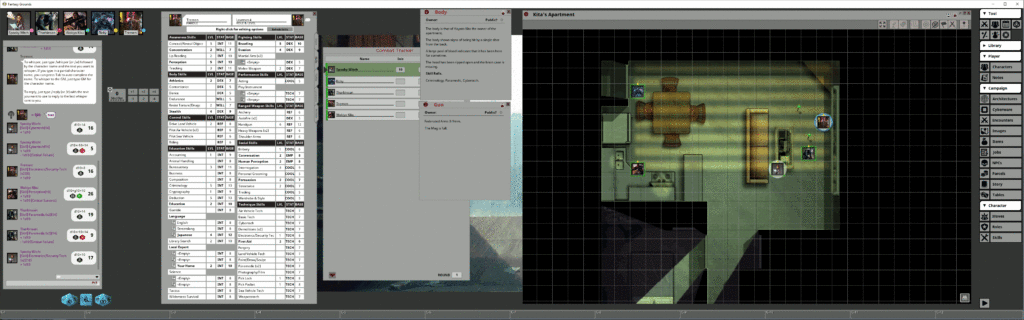
Screen shot of FGU as at the end of the session

Note: This is a compressed view - to see the image at full size click on the image (and then on the subsequent page click again (and, depending on your browser, an additional time!))

Setup for joining us on Fantasy Grounds

First published 3rd September 2024

We use a couple of bits of software to allow us to play roleplaying via a virtual tabletop:


Discord

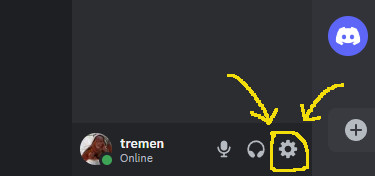
A partial screen capture of the main discord app with the icon for User Settingshighlighted

The location of the settings icon

To allow voice communication we use discord. The desktop version can be downloaded for free from here. You do not need to pay anything to download, setup and use discord1. Once installed and you've registered yourself as a user contact myself or Neil to get an invite to what Discord calls our "server" (a collection of text, voice and even video channels).
There are a few settings we require and/or recommend. You can get to the settings page via the cog icon at the bottom left hand corner of discord's window:

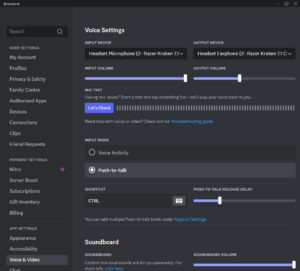
A view of the discord voice & video settings

My Voice & video settings

Once there select Voice & Video and check (and if necessary change) the following settings (note you can click on the image to see at full size):

INPUT DEVICE
Which microphone do you want to use. If you have only one microphone you can probably leave this at the default2.
OUTPUT DEVICE
Which speakers do you want to use. If you have only one of set of speakers you can probably leave this at the default. If, however, you have both a set of speakers AND a headset you need to either change the default in Windows to send sound to your headset or choose which one discord should use here3.
INPUT VOLUME
Leave at the default of 100% unless everyone complains you're too loud. If you find someone else is too loud you can adjust just their volume as explained below.
OUTPUT VOLUME
If you're finding everyone else is too loud or too quiet you can change the global volume here.
INPUT MODE
Select Push-to-talk4.
SHORTCUT
Choose which key to press when you want to speak. I use the left control button on the keyboard5 but Neil uses one of his mouse buttons, You can choose almost any key for this.
PUSH-TO-TALK RELEASE DELAY
Move the slider to increase the time between when you release the push-to-talk key and the time your microphone becomes muted. Note that the default is 0 milliseconds and typically your fingers are ahead of your mouth and hence your final word gets either cut in half or muted completely. Mine is set to around 500ms which seems to work.

There's also a section of settings for Notifications that includes a PTT Activate and a PTT Deactivate notification sounds. Note, however, that the notification sounds are NOT sent to the output device you chose in Voice & Video but just sent as audio to windows. So if your default windows output device are your speakers you'll need to go to your windows settings6, select System then Sound followed by App volume and device preferences and then, With the discord app running, manually choose the devices to be used for sound for the Discord application7.

If you find that one person's voice is too loud or too quiet you can manually how loud they are by right-clicking their name in the voice chat channel and then moving the slider to increase or decrease their individual volume.

Discord will check if it needs updates as part of its startup process and will do an update if necessary

There are also mobile versions of the application for both Android and Apple available in their respective app stores. I do not recommend using a mobile for voice8 but I do recommend it as a way of seeing (and getting notifications about) the text channels.

I strongly recommend going through the setup for discord well before the first game session since, inevitably, it takes a while to get the setup working exactly the way you want it to9


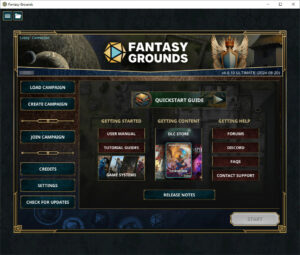
Fantasy Grounds Unity main page screenshot

Fantasy Grounds Unity main page

Fantasy Grounds Unity

You'll be glad to learn that there's less setup needed for Fantasy Grounds Unity. You can download it from their home page. You only need the Free Demo vesrion since both myself and Neil have Ultimate Licenses which allow us to host games for those with the free demo versiom. If you ever wanted to run a game you'd need to get the ultimate version since we have players with only the free demo version.

The free demo version has, for players, all the features of the core license or ultimate versions.

When the time comes we will lead you through how to join a game10. I do recommend that before every game session you fire up Fantasy Grounds Unity and look to see if it needs any updates. Our game sessions are widely enough spread out that there's usually some updates that have been made between our game sessions.


Footnotes

  1. Discord does have a premium currency called Nitro to allow the purchase of additional features. We've not found the need to purchase anything.
  2. I do have two microphones potentially connected so I do set the device here.
  3. Similarly I do have both speakers and a headset so have to set the output device.
  4. This keeps the channel quiet except when someone wants to talk and hence avoids unneccessary distractions.
  5. Note that when I press the left control key to push-to-talk it still acts as a control key so I do have to be aware of that should I try to use any other key (for example to do something in Fantasy Grounds Unity).
  6. These instructions assume you're using Windows 10.
  7. Note that this is a real pain since whenever discord updates its main application the windows settings treats it as a new application and you'll have to go in and change these settings again - I haven't found a better way to do this so far.
  8. It does work but getting push-to-talk to work is not as straightforward.
  9. Don't get me wrong, it is good software but as seen above it can require a fair bit of setting up to get everything the way you want it to be.
  10. Assuming, of course, you have successfully set up Discord and joined the voice chat channel.